
Content Branching
Rosmarium COS introduces Content Branching, a revolutionary way for marketing and editorial teams to collaborate on large campaigns or site redesigns without disrupting the live production environment.
By treating content exactly like software code, your teams gain the confidence to iterate quickly and securely.
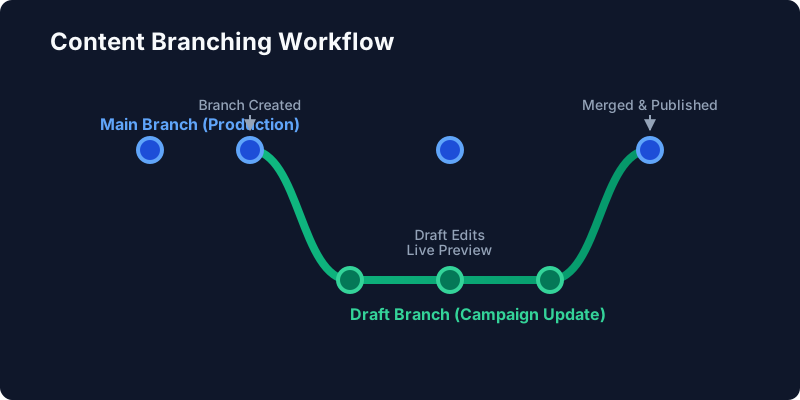
How It Works
Traditional CMS platforms rely on a single “Draft” state, which makes it nearly impossible for multiple people to work on sweeping changes simultaneously without stepping on each other’s toes. Rosmarium solves this by allowing you to create isolated branches:
Create a Branch
Start a new branch (e.g., summer-campaign) based on the current live content state.
Work in Isolation
Make changes to multiple entries, create new pages, or update assets. These changes exist only in your isolated branch context.
Live Preview
Generate a branch-specific preview link to safely share the WIP campaign with external stakeholders.
Merge to Production
Once approved, merge the entire branch into main with a single click, taking the campaign live instantly.
Conflict Resolution
If another editor updates an entry on main while you were working on it in your branch, Rosmarium’s intelligent merge engine will detect the conflict.
The Admin Dashboard provides a visual Three-Way Merge tool, allowing you to easily choose which changes to keep, line-by-line or block-by-block, ensuring you never accidentally overwrite someone else’s work.
Using the Developer API
You can programmatically create branches and commit changes using the Rosmarium SDK:
import { RosmariumClient } from '@rosmarium/client';

const client = new RosmariumClient({ apiKey: 'YOUR_API_KEY' });

// 1. Create a new branch
const branch = await client.branches.create({
  name: 'holiday-promo',
  baseBranchId: 'main'
});

// 2. Make changes within the branch context
await client.content.update('hero-banner', 'entry_123', {
  title: 'Holiday Mega Sale!',
  discount: 40
}, { branch: branch.id });

// 3. Merge branch back to main
await client.branches.merge(branch.id);