Visual Live Preview
Rosmarium’s Visual Live Preview bridges the gap between powerful developer APIs and intuitive content management tools. It provides a true “What You See Is What You Get” (WYSIWYG) experience, allowing content editors to see their changes in real-time as they type, without ever needing to hit the “Save” button or wait for a rebuild.
How It Works
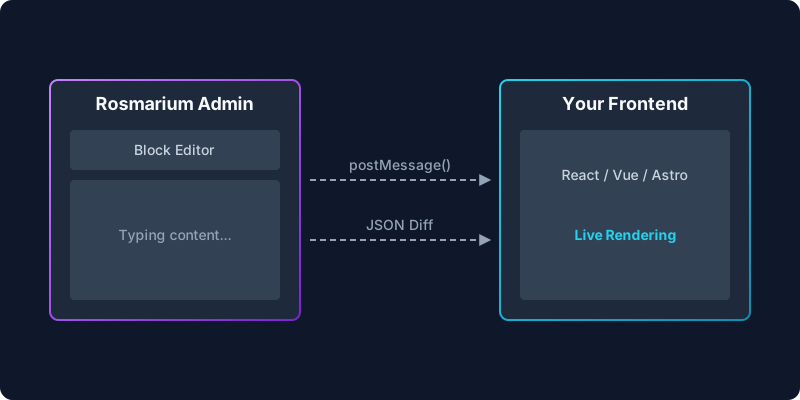
Because Rosmarium is a headless CMS, your frontend lives completely separate from your content repository. To enable seamless live previews, Rosmarium establishes a secure, real-time connection between the Admin Dashboard and your frontend application.
The Admin Dashboard requests a short-lived JWT preview token for the specific entry being edited to ensure security.
Your frontend application (Next.js, Nuxt, Astro) is loaded within an iframe directly alongside the content editor.
As the editor types, field updates are instantly transmitted to the iframe via secure postMessage API events.
Your frontend application intercepts these messages and instantly re-renders the React/Vue components on screen.
Developer Integration
Adding Live Preview support to a Next.js or React application is incredibly simple using our official React SDK. Wrap your layout with the LivePreviewProvider and pass the initial content data fetched from the server. The hook will automatically merge real-time updates when the app is viewed inside the Rosmarium Admin iframe.
import { useLivePreview } from '@rosmarium/react';
import { BlogPost } from '@/components/BlogPost';

export default async function Page({ params }) {
  // Fetch initial content from Rosmarium
  const initialData = await fetchRosmariumEntry('post', params.slug);

  return (
    <LivePreviewComponent initialData={initialData} />
  );
}'use client';
import { useLivePreview } from '@rosmarium/react';
export function LivePreviewComponent({ initialData }) {
// Automatically listens to postMessage events from the Admin UI
// and merges the live draft data with the initial data.
const { data } = useLivePreview(initialData);
return <BlogPost content={data} />;
}Device Simulators
Within the preview pane, editors can easily toggle between Desktop, Tablet, and Mobile viewports to ensure their content looks perfect across all devices before hitting publish.